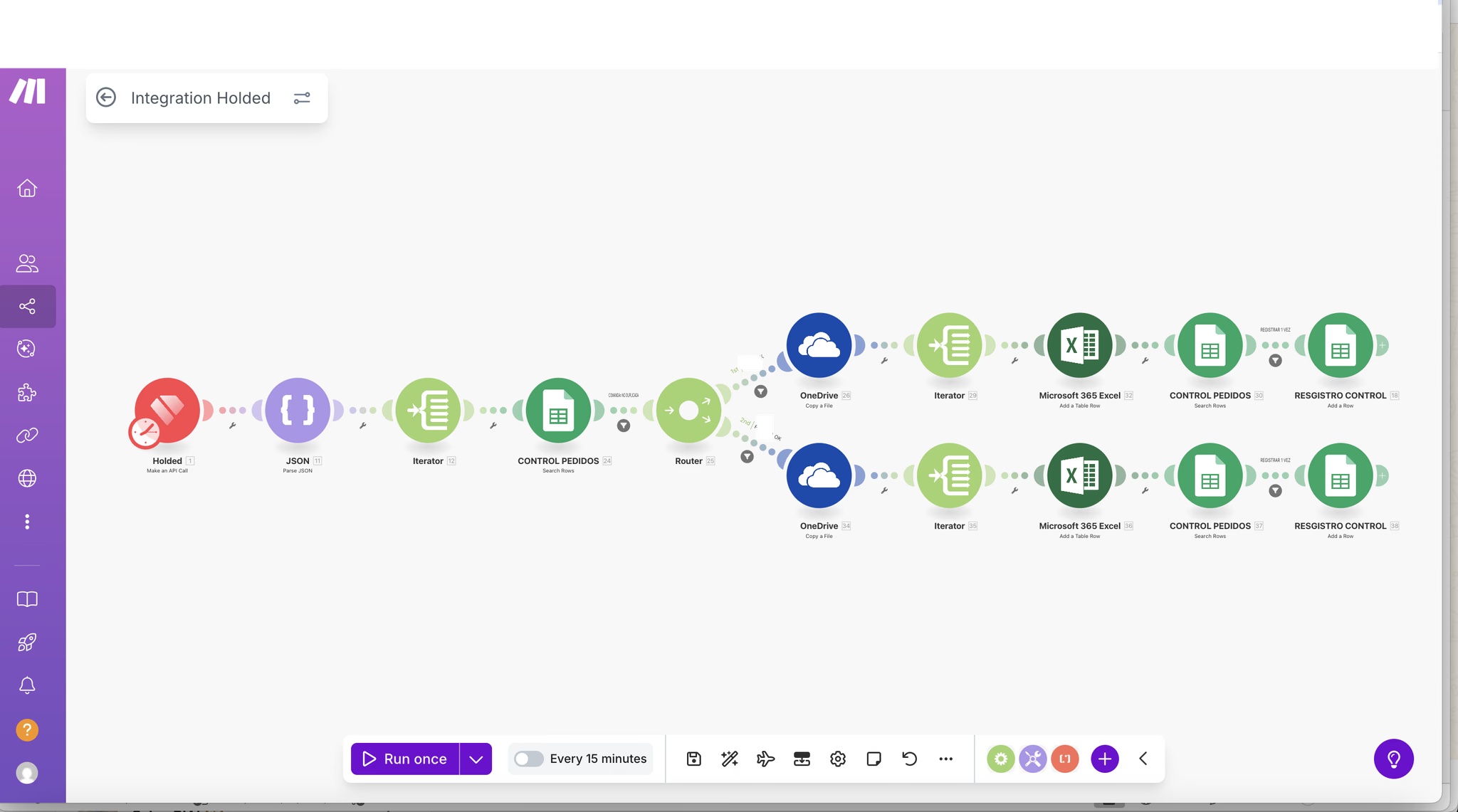
In short
- Make is a visual platform for automating business processes across apps, with branching logic, filters and error handling.
- Compared with Zapier and n8n, Make usually suits SMEs that need multi-branch flows without maintaining their own servers.
- Prioritise what to automate by crossing impact and frequency: start with repetitive tasks that touch customers or money.
- Every scenario needs an owner, error alerts, a log and minimal documentation to survive team changes.
- AI automation (classifying, extracting, translating) works best with human review on sensitive steps.
If someone in your company moves data from a form to the CRM, from an email to Holded or from a spreadsheet to a report, you already have candidates for automation. At Vycte we build these flows for industrial and exporting SMEs, and this guide covers what works, what breaks and where to start.
What Make is and what it does for a business
Make (formerly Integromat) is a no-code automation platform. Each automation is a scenario: a trigger (a submitted form, a new invoice, a set time) followed by modules that read, transform and write data in other apps.
Its strength is visual logic: routers to split the flow into branches, filters to decide what goes down each one, iterators and aggregators to work with lists (for example, the lines of an order) and error handlers to decide what happens when something fails. It has connectors for hundreds of apps, including Holded, Google Workspace, Microsoft 365, Shopify and the main AI models, and for anything without a connector you can use webhooks and HTTP calls to any API.
In practice, Make automates business processes that today depend on someone remembering: adding a lead, creating a quote, chasing an overdue payment or preparing a report.
Make vs Zapier vs n8n: which to choose
All three tools solve the same problem with different approaches. None is better in the abstract: it depends on how complex your flows are, who will maintain them and where you want your data to live.
| Criterion | Make | Zapier | n8n |
|---|---|---|---|
| Approach | Visual editor with branches, filters and iterators | Linear step-by-step flows, highly guided | Node editor with a code option (JavaScript or Python) |
| Learning curve | Medium | Low | Medium to high |
| Complex flows | Handled very well visually | Possible, but they become hard to read | Very flexible with technical staff |
| Hosting | Make's cloud, with EU regions | Zapier's cloud | n8n cloud or your own server (self-hosted) |
| Maintenance | A trained operations profile can handle it | Any business user can handle it | Needs someone technical, especially if self-hosted |
| Best fit | SMEs with multi-branch processes across CRM, ERP and email | Quick, simple automations between popular apps | Technical teams, AI agents or data that cannot leave the company |
Our rule of thumb: if the flow fits in three steps with no conditions, Zapier is fastest. If there are branches, lists and several business apps, Make. If you have a technical team or need self-hosting for data policy reasons, n8n. At Vycte we work with Make and n8n depending on the case.
10 Make automations for B2B and exporting businesses
These are the automations we most often see working in SMEs that sell to other businesses or export. All of them start from tools our clients already use.
1. Website form lead into the Clientify CRM
Your website form creates the contact and the opportunity in Clientify, assigns a sales rep by country or product, creates a first-contact task and sends an alert by email or WhatsApp. No lead sits in an inbox. More detail in our guide to Clientify CRM with WhatsApp for B2B.
2. Won deal to a quote in Holded
When you mark an opportunity as won in the CRM, Make creates or updates the customer in Holded and generates the quote or order with the right products and price list. We cover it in depth in Holded integrations.
3. Supplier invoices with OCR into Holded
Invoices arriving by email are read with OCR, supplier, base amount, taxes and due date are extracted, and they are recorded in Holded for review. It is one of the fastest-payback automations; see it on automate your invoices (page in Spanish).
4. Distributor orders
Distributors send orders by email, Excel or a form. Make normalises the format, creates the sales order in Holded, checks stock and alerts the warehouse. If you use B2B catalogues in Holded, the order can arrive already structured.
5. Payment reminders
Every morning Make reviews overdue invoices, sends a staged reminder (friendly notice, second notice, phone call) and creates a task for the account owner when it is time to step in.
6. Automated weekly reports
On Mondays, a scenario pulls sales, open opportunities, outstanding payments and new leads into a sheet or dashboard and sends the summary to management. You stop depending on whoever knows how to build the spreadsheet.
7. Trade show leads into the CRM
Contacts captured at a trade show enter the CRM tagged with the event, assigned to a sales rep and with a scheduled follow-up sequence. If you capture them with Exporta.ai (QR or business card with OCR), the move to the CRM is direct.
8. AI translation of product sheets
When a new technical sheet is approved, an AI module generates versions in the languages of your markets and places them in a folder for review before they are published in the catalogue or on the website.
9. Enriching and verifying prospecting leads
Contacts from a prospecting search are verified, duplicates are removed and they are loaded into the CRM with their source campaign. It fits with what we explain in AI lead generation.
10. Syncing stock and orders with your online store
If you also sell through Shopify or PrestaShop, Make keeps stock, customers and orders aligned with Holded so invoicing and the warehouse work from the same data.
How to prioritise what to automate: impact by frequency
The most common mistake is starting with the flashiest flow instead of the most useful one. To decide, list your repetitive tasks and score each on two axes: frequency (how many times a week it happens) and impact (time it takes, cost of an error and whether it touches customers or money).
| Quadrant | Example | What to do |
|---|---|---|
| High frequency, high impact | Leads into the CRM, supplier invoices, payment reminders | Automate first |
| Low frequency, high impact | Onboarding a new distributor, month-end close | Automate with a checklist and human review |
| High frequency, low impact | Internal notifications, file copies | Automate if it is simple |
| Low frequency, low impact | One-off tasks | Do not automate for now |
Before building, map the process as it is today. Often the problem is not a lack of automation but a poorly defined process, and automating a confusing process only multiplies errors.
Best practices so your automations do not break
An automation that fails silently is worse than none at all. These are the rules we apply on every project:
- Error handling: add error handlers to critical modules and decide whether to retry, ignore or stop. A failure should trigger an email or chat alert to the owner.
- Logging: record in a sheet or data store what was processed, when and with what result. It will save you when someone asks why an invoice never arrived.
- One owner per scenario: every automation has a named person who receives alerts and approves changes.
- Minimal documentation: a clear name, what it does, which apps it touches, which connections it uses and who to alert if it fails.
- Company connections: connect apps with corporate accounts, not personal ones, so nothing breaks when someone leaves.
- Test before activating: run the scenario with test data and check each step before scheduling it.
- GDPR: process only the data you need, review each tool's data processing agreement, choose EU hosting where possible and do not send personal data to AI models without a clear legal basis.
AI automation inside Make
Make includes modules for the main AI models, which opens up tasks that could not be automated before because they required reading or writing: classifying incoming emails by type of enquiry, extracting data from a PDF with no fixed layout, summarising a meeting for the CRM or drafting a first reply.
The rule is simple: AI proposes and a person approves on steps that touch customers, prices or accounting. That way you get the speed without the risk of an error reaching a customer.
Make training for teams
Automations last when someone inside the company understands them. That is why, as well as building scenarios, we train teams so they can maintain them and create simple flows on their own.
- Fundamentals: scenarios, modules, data mapping, filters and routers.
- Mapping your own processes and choosing what to automate with the impact and frequency matrix.
- Building a first real scenario for your company, end to end.
- Errors, logs, alerts and maintenance.
- Responsible use of AI modules and data protection.
You can see our approach in our training service. Ask us whether your case can be subsidised through FUNDAE in Spain. To practise on your own, Make offers free courses at its Make Academy.
Real case: Make automation at Carvisa
It is not an isolated case. At Jata, a small household appliance manufacturer with more than 80 years of history, Make automation alongside Holded and a custom B2B catalogue was part of a project that left its export processes 100% automated.
If you use Holded or Clientify, you already have the foundation: Vycte is an official Holded Solution Partner and an official Clientify partner, and we design automations around those tools.
Frequently asked questions
Which is better, Make or Zapier?
It depends on the flow. Zapier is quicker to set up for simple, linear automations between popular apps. Make is more comfortable when there are branches, conditions, lists of items and several business apps, such as a CRM and an ERP. Many B2B SMEs end up on Make because their real processes have exceptions that become hard to maintain in a linear flow.
Do I need to know how to code to use Make?
Not for most flows. Make is configured visually by dragging modules and mapping fields. It does help to understand how data is structured (fields, lists, dates) and, in advanced cases, to read an API's documentation to use the HTTP module. With hands-on training, an operations or admin profile can maintain simple scenarios.
Can Make connect to Holded and Clientify?
Yes. Make has a Holded connector with actions for contacts, products, projects and other items, and Clientify can be handled through its connector or its API. With both you can automate flows such as form lead to CRM, won deal to quote or customer sync. It is worth reviewing which fields and events you need before building.
Is Make GDPR compliant?
Make lets you host data in European Union regions and offers a data processing agreement, but compliance also depends on how you design your flows. Process only the data you need, document what information passes through each scenario, review the terms of every connected app and take particular care when sending personal data to AI models.
Where should I start automating processes in my company?
List your repetitive tasks and score them by frequency and impact. Start with one that happens daily, touches customers or money and has a clear process, such as leads entering the CRM or recording supplier invoices. Build that flow with error alerts and logging, measure the time saved and then move on to the next one.