In short
- Online stores (Shopify, WooCommerce, PrestaShop) have official integrations: orders and products flow into Holded and stock can sync both ways.
- HubSpot connects to Holded through Zapier; Clientify offers its own integration that syncs contacts and companies, not invoices.
- Make and Zapier cover almost any app, but Zapier triggers take around 15 minutes and Holded custom fields are not transferred.
- The Holded API, with webhooks, is the option when you need your own logic, such as a multi-price-list B2B catalogue or a distributor portal.
- Most problems come from duplicate contacts, wrongly mapped taxes and two-way syncs with no single source of truth.
Why integrate Holded with the rest of your tools
Holded brings together invoicing, accounting, inventory and treasury. But orders start in your online store, opportunities in your CRM and transactions in your bank. If each system runs on its own, someone ends up copying data by hand and errors show up at the worst time: on the customer invoice or at quarter close.
As a Holded Gold Solution Partner, we see at Vycte that a well-designed integration is what turns the ERP into the centre of operations. A poorly designed one creates duplicates, wrong taxes and distrust in the data. This guide separates what Holded does natively from what needs connectors or development, based on its official documentation as of October 2026.
Types of Holded integrations
1. Native, from the Holded Store
They are switched on from the Holded Store inside your account. The official integrations page lists 27 as of October 2026, including Shopify, WooCommerce, PrestaShop, Wix, Amazon, Stripe, PayPal, GoCardless, Google Drive and Dropbox. Bank connections, by contrast, are set up from Treasury and run through external providers.
2. Third-party connectors
Some tools build their own integration with Holded using its API. Clientify is one example: it syncs contacts and companies from its integrations area. The scope is defined by the connector's vendor, not by Holded, so read their documentation before assuming anything.
3. Make and Zapier
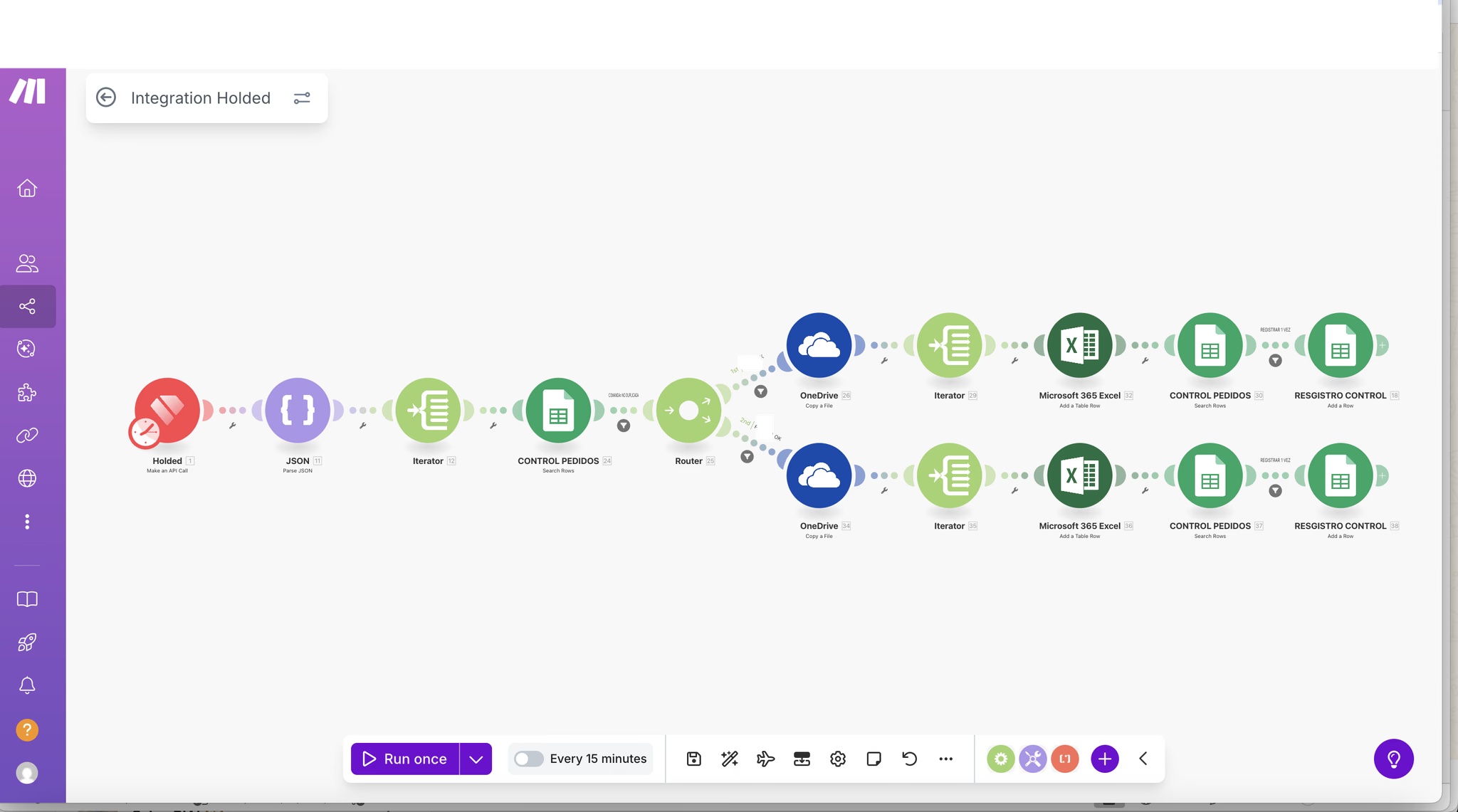
Holded Zapier: the official app offers triggers (new contact, new opportunity, new sales invoice, new sales receipt and new sales order) and actions such as create contact, opportunity or document. Holded Make: the Holded app in Make has 38 modules, with actions to create contacts, leads, products, projects or invoices and search modules to check whether a record already exists.
4. Custom API integration
The Holded API exposes sales, purchases, payments, contacts, products, stock and warehouses, with API-key authentication, pagination, usage limits and webhooks. Holded also publishes an MCP server for connecting AI assistants. It is the right option when your business logic does not fit a standard scenario.
The most requested Holded integrations, one by one
| Tool | Type | What syncs | Direction |
|---|---|---|---|
| HubSpot | Zapier, with Holded templates | Contacts, companies and deals; documents with a multi-step Zap | Both, depending on template |
| Clientify | Clientify's integration | Contacts and companies; not invoices or quotes | Two-way |
| Shopify | Native (official app) | Paid orders as invoice, receipt or sales order; products; stock; refunds as credit notes | Orders and products into Holded; stock both ways |
| PrestaShop | Native (official plugin) | Orders, products, contacts and stock; no refunds | Products into Holded; stock both ways if enabled |
| WooCommerce | Native (official plugin) | Orders as drafts, products, contacts and stock; no refunds | Products into Holded; stock both ways under conditions |
| Banks | Native (Treasury) | Bank transactions for reconciliation | From bank to Holded |
| Google Drive | Native | Manual sending of invoices, quotes, proformas and receipts; lists to Google Sheets | From Holded to Drive |
| Make / Zapier | Automation platform | Contacts, opportunities, documents, products and more | Depends on scenario or Zap |
Some details that change decisions: stock sync with stores requires the Inventory module and matching SKUs; per-country tax setup for stores requires the Premium plan; WooCommerce supports only one warehouse; and PrestaShop needs version 1.7.8 or later with PHP 7.4 or later.
Use cases: from store, CRM or catalogue into Holded
Online store order to Holded invoice
To connect Holded with Shopify, WooCommerce or Holded PrestaShop, you choose which document each order creates (invoice, sales receipt or sales order), how contacts are created and whether stock syncs. If you sell to businesses in other countries, check first how VAT numbers and taxes arrive with each order.
Won CRM deal to quote or invoice
With the Holded HubSpot integration via Zapier you can create a document in Holded when a deal changes stage, using a paid multi-step Zap. With Holded Clientify, the integration keeps contacts and companies aligned, and the document is created in Holded or by a Make scenario that reads the deal and generates the quote. We cover it in our Clientify and WhatsApp B2B guide.
B2B catalogue, stock and price lists
A custom B2B catalogue for distributors reads products, stock and each customer's price list from Holded, and sends back orders in the right currency. It is something Vycte builds on the API, not a standard integration. We explain it in our guide to Holded for exporting companies.
Supplier invoices with OCR
Invoices arriving by email are read with OCR and AI, supplier, base amount, VAT and number are extracted, and they are recorded in Holded. This is Vycte's invoice automation service (page in Spanish).
Common mistakes when integrating Holded
- Duplicate contacts: if the Zapier action does not receive a matching identifier, Holded creates a new contact every time. Search before creating (find contact, or a search module in Make) and use the VAT number or email as the unique key.
- Wrongly mapped taxes: the store's tax is matched to the taxes in your account. An intra-EU sale or an export with the wrong tax type throws off Spanish forms 303 and 349.
- Two-way sync without rules: if two systems can edit the same field with no source of truth, they overwrite each other. Decide which system owns each piece of data: prices and stock in Holded, sales data in the CRM.
- Lost custom fields: Holded custom fields are not transferred via Zapier. If you rely on them, consider Make or the API.
- Expecting real time where there is none: Zapier triggers can take around 15 minutes and bank sync runs at intervals.
- Forgotten refunds: WooCommerce and PrestaShop do not sync refunds; you need to create the credit note in Holded.
Holded API: when a custom integration pays off
Make and Zapier solve most cases. The API pays off when there is high volume, your own logic or a piece that does not exist as an app: a customer portal, a multi-price-list B2B catalogue, a product configurator or a custom management platform.
- You generate an API key in Holded and every call is authenticated with it; treat it like a password.
- Webhooks let you react when something changes in Holded without polling every few minutes.
- Design for usage limits and pagination from the start, not when it fails in production.
- Document what the integration creates and with which numbering series, so accounting can identify it.
One example of this approach is Carvisa: a custom platform built with Supabase, Vercel and Make that centralises bookings, maintenance and invoicing. If you want to automate without development, start with our guide to Make automations.
How to plan a Holded integration project
- Map the real flow: where each piece of data comes from (order, customer, price, stock, payment) and who uses it next.
- Choose the source of truth for each piece of data and the direction of each sync.
- Choose the simplest integration type that solves it: native, connector, Make/Zapier or API.
- Clean the data first: contacts with VAT numbers, products with unique SKUs, taxes by transaction type.
- Test with real data in draft, including edge cases: refunds, foreign customers, partial payments.
- Monitor: error alerts, execution logs and an internal owner.
If you also use Clientify, as an official partner we can set up the CRM and the integration in the same project: Clientify service. For broader processes, see our digitalisation service.
Frequently asked questions
Does Holded integrate natively with HubSpot?
There is no direct integration: Holded connects HubSpot through Zapier, with templates to sync contacts, companies and deals in both directions. A single-step Zap works on Zapier's free plan; to search before creating or to generate documents when a deal closes you need a multi-step Zap, which requires a paid plan.
What does the Holded and Clientify integration sync?
According to Clientify's documentation, it syncs contacts and companies in both directions and keeps records linked to avoid duplicates. It does not sync invoices, quotes or other accounting documents. If you need a quote created in Holded when you win a deal in Clientify, a Make scenario or the API can handle it.
Can I connect Holded with Shopify and sync stock?
Yes. The official integration imports orders as invoices, sales receipts or sales orders, imports products from Shopify into Holded and syncs stock both ways if SKUs match and you have the Inventory module. Refunds become credit notes, and you can connect several stores to the same Holded account.
Is Make or Zapier better for Holded?
It depends on the flow. Zapier is quick to set up with official templates and Holded triggers, although they can take around 15 minutes. Make offers visual scenarios with more logic, 38 Holded modules and searches to avoid duplicates. For flows with several conditions or high volume, we usually recommend Make.
What can you do with the Holded API?
The Holded API lets you read and create sales, purchases, payments, contacts, products, stock and warehouses, with API-key authentication, pagination, usage limits and webhooks. It is the option for customer portals, custom B2B catalogues or in-house platforms. Holded publishes the full reference on its developer site.